
User manual
Flights
The Flights cluster holds the organization's logbook and every pilot's personal logbook. European regulation (EU Reg. 2019/947, AMC1 UAS.SPEC.050) requires complete records, kept for three years and protected from tampering: here that requirement is architecture, not good intentions.
The logbook entry
Every flight is an entry with drone, pilot, take-off and landing to the second, places and coordinates, the batteries fitted, VLOS or BVLOS, the operational authorisation number, anomalies and — if the mission is attached to an operation order — the ODO-2026-001 / TO-3 reference. The duration is computed by itself from the difference between landing and take-off, and the drone's hours grow accordingly.
Batteries can only be set when the entry is created: they join the flight, accumulate hours and go back to "To charge" on their own. You can attach telemetry in JSON up to 20 MB, as an array of points {t, lat, lng, alt_m, speed_kmh, battery_pct}.
Append-only with a hash chain
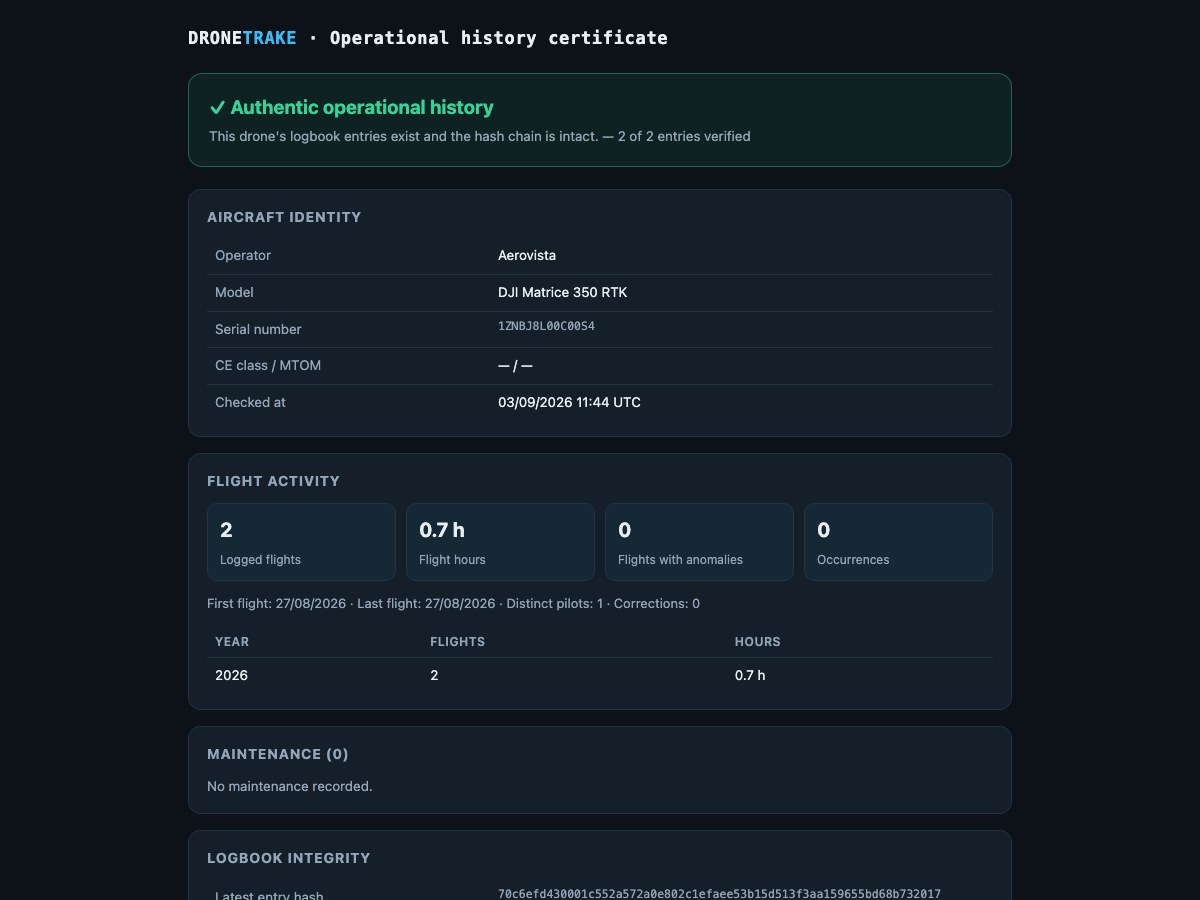 Anyone who scans the QR code lands here without an account: they see the verification result, not your internal data.
Entries cannot be edited and cannot be deleted. Each entry is chained to the previous one with a SHA-256 hash computed over the previous hash plus the entry's content, in a per-organization chain that starts from a hash of all zeros. Tampering with an entry breaks the chain in a way that is obvious and verifiable.
An edit attempt is refused by the system, always: there is no field that makes an exception. Deletion is blocked while the entry is less than three years old; in the interface the button does not exist at all. Mistakes are put right with a correction: from the flight's page you create a new entry linked to the original, prefilled with its data, which joins the chain in its own right. The original stays where it is, visible, with the correction shown next to it.
On the flight's page the entry fingerprint is shown in full and can be copied. What is in the chain is the drone, the pilot, the times, the places and coordinates, VLOS, the operational authorisation number, the anomalies and the reference to the corrected entry; what is not is the mission, the telemetry, the batteries and the source, which are auxiliary data and rewritable.
Mission reports carry a verification QR: whoever receives the document opens a public page that recomputes the chain from scratch on every visit and shows, flight by flight, whether the fingerprint is intact, along with the fingerprints of the delivered files. There is also an operational history certificate for a single drone, without places, pilots or clients.
Exports
From the logbook you download the Inspection export (PDF), choosing a drone (or all of them) and a date range, with the chain's head hash printed on the document. The aircraft technical logbook (QTB) is instead an action on the drone's page: the aircraft's identity, all of its flights, maintenance and assigned batteries — the export to show at an inspection.
Pilot logbook
Every pilot has their own page, limited to the flights flown in this organization: total career hours with a flight count, hours in the current year, hours over the last 90 days and a recent activity indicator.
About that indicator, one honest thing needs saying: it is a plain "have you flown in the last 90 days, yes or no". It does not apply any regulatory currency rule, it does not count minimum hours and it does not count take-offs: it is a reminder, not a certificate of fitness.
On screen you see the latest 50 entries; the full history lives in the PDF (with the statistics at the top) and CSV exports — handy for documenting your experience at a renewal.
Import from DJI Cloud
For linked DJI accounts there is an ingest channel that receives flights from the cloud and writes them into the logbook. The drone is recognized by its serial number: if that serial is not in the fleet the flight is refused with an explicit message, because an entry with no identified aircraft is worthless. The pilot is matched by email, falling back to the first Owner or Admin. Unknown batteries are inventoried automatically against the flight's drone, with a label derived from the serial and a note explaining how they came to be.
The same flight imported twice does not create a duplicate: the external reference is unique per organization. The raw payload is always archived, and telemetry is only attached if the flight really carries points — better no track than a fake one.
One necessary clarification: linking a DJI account is not a switch you flip in the panel. It requires the operator's DJI developer account and a dedicated configuration, and it has to be enabled on the installation.
CSV import from AirData
If you are coming from AirData UAV you can import your logs without retyping anything. The Import from AirData (CSV) action accepts the per-flight "Flight Log CSV", up to 20 MB: you pick the drone, the pilot and, if you want, the battery fitted — the AirData CSV does not carry those identities, so you supply them.
The parser recognizes column names tolerantly — capitals, spaces, hyphens and underscores make no difference — and works out the separator by itself, comma or semicolon. Conversions are automatic: feet become meters, miles per hour and meters per second become km/h, degrees Fahrenheit become Celsius, millivolts become volts and milliamps become amps. The decimal comma of European exports is handled too. Current is taken as an absolute value, because DJI logs record it negative on discharge and AirData positive.
On times: if the file carries an absolute timestamp, take-off and landing come from there and the dialog's "take-off date & time" field is ignored. If the file only has a relative time, that date becomes mandatory and the system tells you so.
Malformed rows do not fail the import: they are skipped and counted, and the count appears in the closing notification along with samples, duration, maximum altitude and minimum battery. If essential columns are missing the import stops and lists which ones, using AirData's own names. Re-importing the same file does not create a duplicate — recognition is based on the file's fingerprint, so a re-export that differs even slightly would be imported as a new flight.
From the track the system also derives warnings that end up in the entry's anomalies: battery below 15%, fewer than eight satellites, cell imbalance of 150 mV or more. Anomalies are in the hash chain, so that text stays on record.
Flight telemetry
On the flight's page, below the logbook entry, there are three blocks.
Telemetry and replay shows maximum altitude, maximum speed, distance covered, minimum battery and minimum cell, then the altitude-and-speed and battery-and-cell-voltage charts, and finally the track on the map with the take-off and landing markers. Underneath the track, the UAS zones uploaded by the organization are drawn in red.
Battery telemetry is the cell block. If the log carries per-cell voltages, you see one curve per cell; if it does not — which happens with historical files, which only kept the minimum and the spread — you see instead the band between the minimum and maximum cell, reconstructed from the spread. Pack temperature runs alongside. Two dashed thresholds are drawn on the chart: deep discharge at 3.30 V per cell and overtemperature at 60 °C, both labelled with their value. The second chart cross-plots battery percentage against altitude.
Here is where the most important limit has to be stated, because it changes what you are allowed to conclude: if the flight has two or more batteries, the cell data is not attributable. There is no way to know which cell belongs to which pack, so the system writes no statistics against either of them and that flight contributes nothing to the health score. The chart can still draw the trace — it comes from the file — but it cannot be referred to a pack. In the same way, if the track carries no battery data (a GPS-only recording, for instance), the block states that there is nothing rather than showing an empty chart.
Post-flight analysis lists the automatic findings recomputed from the telemetry: altitude above 120 m and battery below 10% are flagged as major, battery below 15%, fewer than six satellites and distance from take-off beyond 500 m as minor. From there, with one action, you open an incident already prefilled with those findings.